Here's a few stuff you can do in your PC to make it look cool (or pretend to be)
1) Change your Cursor appearance
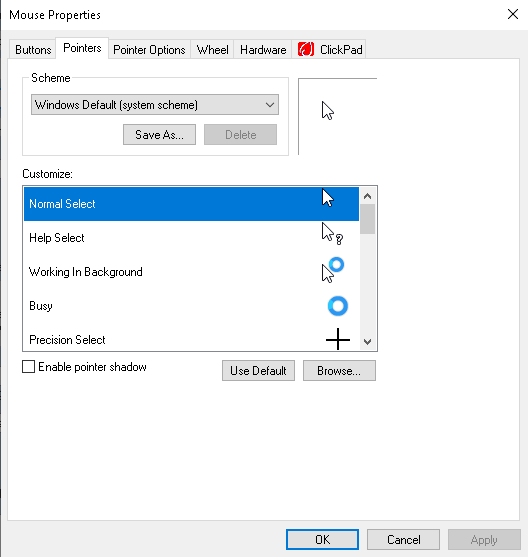
In Windows, search "Change the mouse pointer display or speed"
Go to pointers, and you can choose Browse for replacing to your cursor.
*You'll need .cur file, if you want to create it you can use
RealWorld Cursor Editor
2) Add your own app / shortcut to be recognizable in Terminal Command
Create a shortcut file, name it to the shortcut name you'll use in Terminal
Put that shortcut (or exe if you have) in System32
E.g: C:\Windows\System32
*In CMD, you need to add .lnk at the back if its a Shortcut, but for exe it can be run directly without specify .exe
3) Add new option in Explorer's Right Click Menu
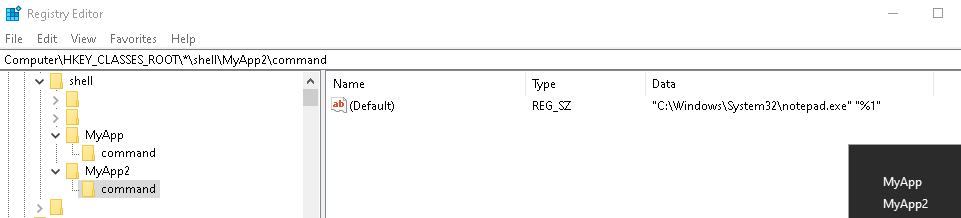
HKEY_CLASSES_ROOT\*\shell
Right click shell and create a new key
Let's say MyApp (You can change this to any name you want)
In MyApp, create a key (folder) named command
In the command, click (Default) and put this (replace with your app path):
"C:\Windows\System32\notepad.exe" "%1"
*Optional: To add icon, you can add String at the MyApp, then fill in the Data as the .exe or icon file you want
E.g: "C:\Windows\System32\notepad.exe"
*You can create more of these shortcuts by simply adding more key (folder) into the shell
Bonus: You can create a menu that can copy a file as full filepath including the the selected file.
cmd /c echo %1 | clip
4) "God Mode" Folder
*This is just a control panel's all options mashed in single folder, so don't expect it to be a huge secret or anything
In your desktop, create a new folder named as below (you can change GodMode to whatever you want as long as the .{....} is correct
GodMode.{ED7BA470-8E54-465E-825C-99712043E01C}